 ROBOT
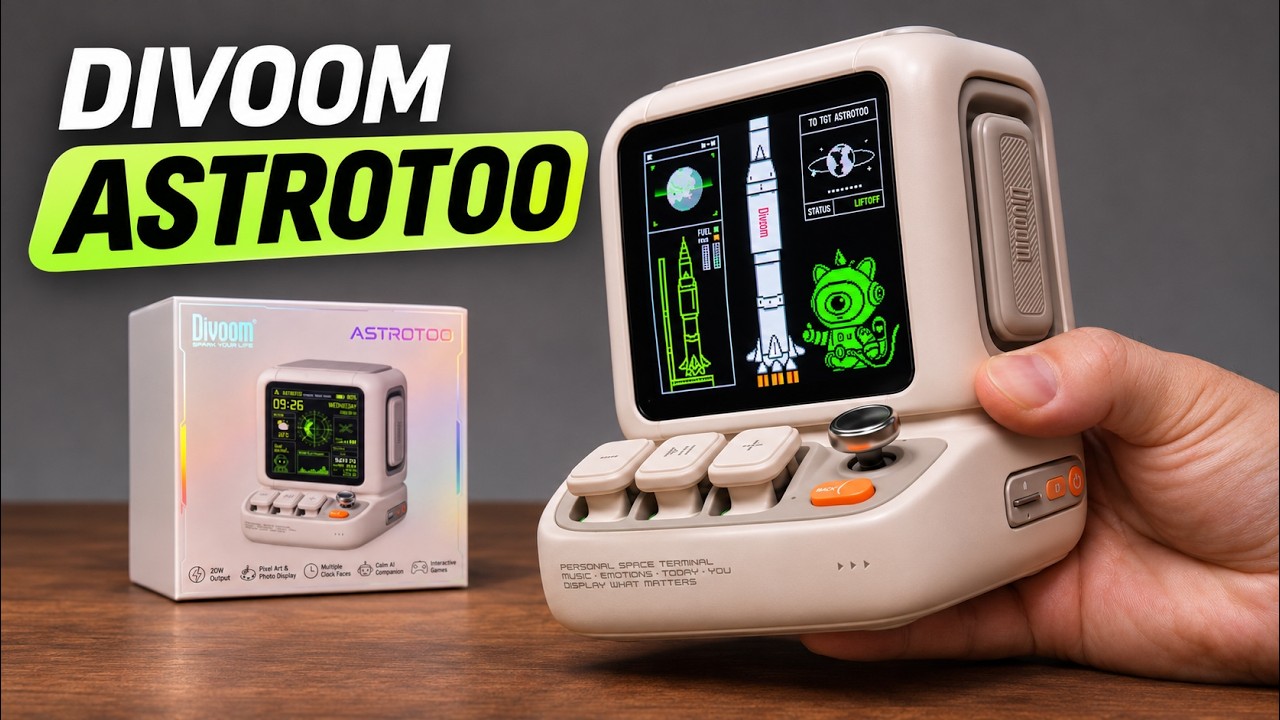
The white Divoom Astrotoo looks like a tiny computer that found a place on the desk. A screen on the front, physical keys below it, and a little joystick give it a retro space-terminal feel. Then you start exploring: music, changing clock faces, animated art, games, and tools you might actually use between videos or work sessions.
For this Robot Boss feature, I’m taking a closer look at the Astrotoo shown in my full ASMR unboxing and hands-on demonstration. The videos above give you two ways in: the Short is a quick tour, while the full video follows the controls and features in more detail. Divoom provided the white unit for the videos.
What is the Divoom Astrotoo?
Astrotoo is a desktop Bluetooth speaker with a customizable display and built-in interactive features. Divoom lists 20W speaker output and a 3.95-inch, 480 × 480 screen. Its small computer-inspired shape gives the display a frame of its own, so it works visually beside a monitor, on a shelf, or among your desk companions.
The interesting part is how those roles fit together. You can use it for music, then leave a clock face or artwork on display afterward. If you like gadgets with buttons and small details to explore, the physical controls are a big part of the appeal.
Pixel art, animated clock faces and photos
The display is the place to make Astrotoo feel personal. In the full video, I explore clock faces, animated pixel art, Divoom App customization, and personalized displays. There is also a photo slideshow option, giving the screen another use beyond showing the time.
For a desk setup, think about what you want to see during an ordinary day. A clock can be useful while editing. Artwork can match the rest of the desk. Photos can turn the same little screen into something more personal. The video lets you compare those ideas with the actual appearance of the white unit.
Mini-games and joystick controls
Astrotoo’s joystick gives its retro design something to do. The built-in mini-games are part of the hands-on demo, alongside the front keys and menu navigation. They make a short break feel more like playing with a tiny desktop gadget than opening another app on your phone.
If the games caught your attention in the Short, move to the full video for a closer look at the controls. Seeing the device next to my hands is useful for judging its scale and how you might reach for it on your own desk.
Bluetooth music and TF/microSD playback
The demonstration includes Bluetooth music and TF/microSD card playback, along with music display themes and animations. That combination gives Astrotoo a role during listening as well as something visual to enjoy.
A hands-on video is helpful for seeing the interface and playback options. Audio heard through a video also passes through the recording setup and your own speakers or headphones, so use it as an introduction to the experience. This feature does not include a measured audio comparison or a battery endurance test.
Pomodoro timer, stopwatch and everyday desk tools
The quieter features are easy to overlook beside the animations. My full video also explores a Pomodoro timer, stopwatch, scoreboard, voice recording and playback, and a noise meter. These are worth a look if you want the device to earn its space after the first afternoon of trying different faces.
The sleep sounds and white noise offer another change of pace. You can see those options in the demo alongside the games and music functions, rather than choosing Astrotoo from its appearance alone.
Is Astrotoo a robot companion?
Astrotoo brings personality to a desk through its design, screen and interactive features. Its main role is a speaker and display. If you found it while browsing the Robot Boss robot collection, think about whether you want music and visual customization, or the movement and pet-like reactions that draw you to a physical robot.
For someone who enjoys retro tech, tactile controls, and changing the look of a desk, that combination is the reason to watch the full demonstration. You can decide which features you would return to and which would just be fun to try once.
Divoom Astrotoo discount: 15% OFF with ROBOTBOSS
Use my Divoom affiliate link below and enter ROBOTBOSS for 15% OFF eligible purchases. Check the selected product, any offer restrictions, and the final checkout total before ordering. Store eligibility, pricing and availability can change.
The Collection entry keeps both videos, the shopping link, and the discount code together. Start with the Short for a quick introduction, then watch the full Astrotoo unboxing and hands-on demo if you want to explore the display, games and desk tools at a slower pace.